

在元件中連線至 FIDL 通訊協定時,需要結合能力路徑和目錄服務。也就是說,診斷連線問題時,可能需要涵蓋幾個不同層面:
- 用戶端會在資訊清單中要求通訊協定能力。
- 供應商會在資訊清單中公開通訊協定能力。
- 元件拓撲會將能力從供應商路由至用戶端。
- 供應商在正確的控制代碼上提供通訊協定。
- 用戶端正嘗試連線至正確的通訊協定控制代碼。
在本節中,您將瞭解一些 API 和工具,協助找出並修正元件連線問題,以及監控元件的長期健康狀態。
監控 FIDL 連線
fidlcat 工具可讓您監控及偵錯 FIDL 連線,追蹤元件傳送及接收的個別 FIDL 訊息。與 Fuchsia 偵錯工具 (zxdb) 類似,fidlcat 會連線至目標裝置上執行的 debug_agent 元件,並監控執行中的程序。
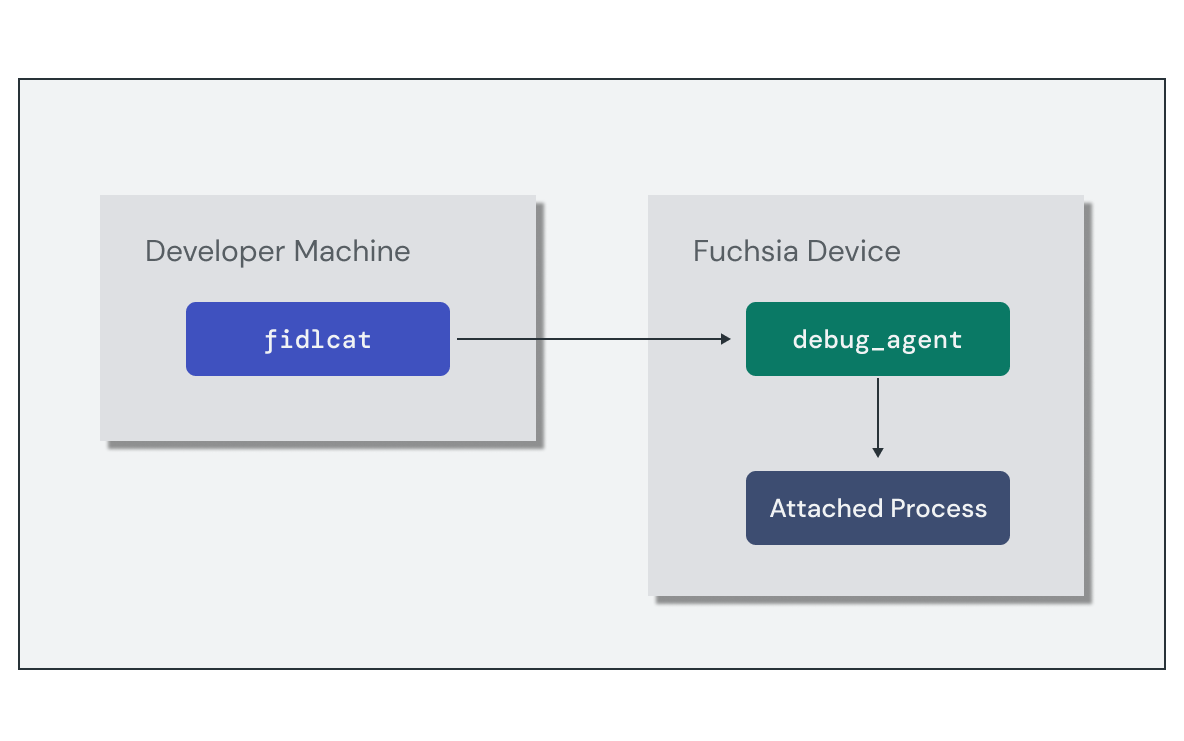
設定監控工作階段需要完成下列高階步驟:
- 在目標裝置上執行
debug_agent元件。 - 執行
fidlcat用戶端並連線至目標裝置。
如要啟動 FIDL 偵錯工作階段,最簡單的方法是使用 ffx debug fidl 指令,在本地 Fuchsia 建構作業的環境中執行所有這些作業。不過,如果您需要個別設定這些步驟,也可以手動執行。
以下是 FIDL 通訊協定要求的 fidlcat 訊息範例。追蹤輸出內容包含每項轉換的實用資訊,包括:
- 元件或程序名稱
- 叫用的系統呼叫
- FIDL 程式庫、通訊協定和方法名稱
- 包含參數或傳回值的訊息酬載
echo-client.cm 256109:256122 zx_channel_read(handle:handle: e4c7c57f, options:uint32: 0, num_bytes:uint32: 48, num_handles:uint32: 0)
  -> ZX_OK
    received response fidl.examples.echo/Echo.EchoString = {
      response: string = "hello world!"
    }
使用「檢查」
元件檢查功能可讓 Fuchsia 元件使用 Inspect API,公開本身的結構化診斷資訊。Fuchsia 會透過開發人員工具和錯誤報告提供這項資訊,協助診斷問題或監控效能。
元件會以命名 Node 樹狀結構的形式公開檢查指標,每個 Node 都包含一組以鍵/值組合形式呈現的 Property。屬性支援各種數字、字串和陣列資料類型。元件檢查器程式庫提供元件根節點的介面,您可以在其中將感興趣的其他屬性附加至應用程式。
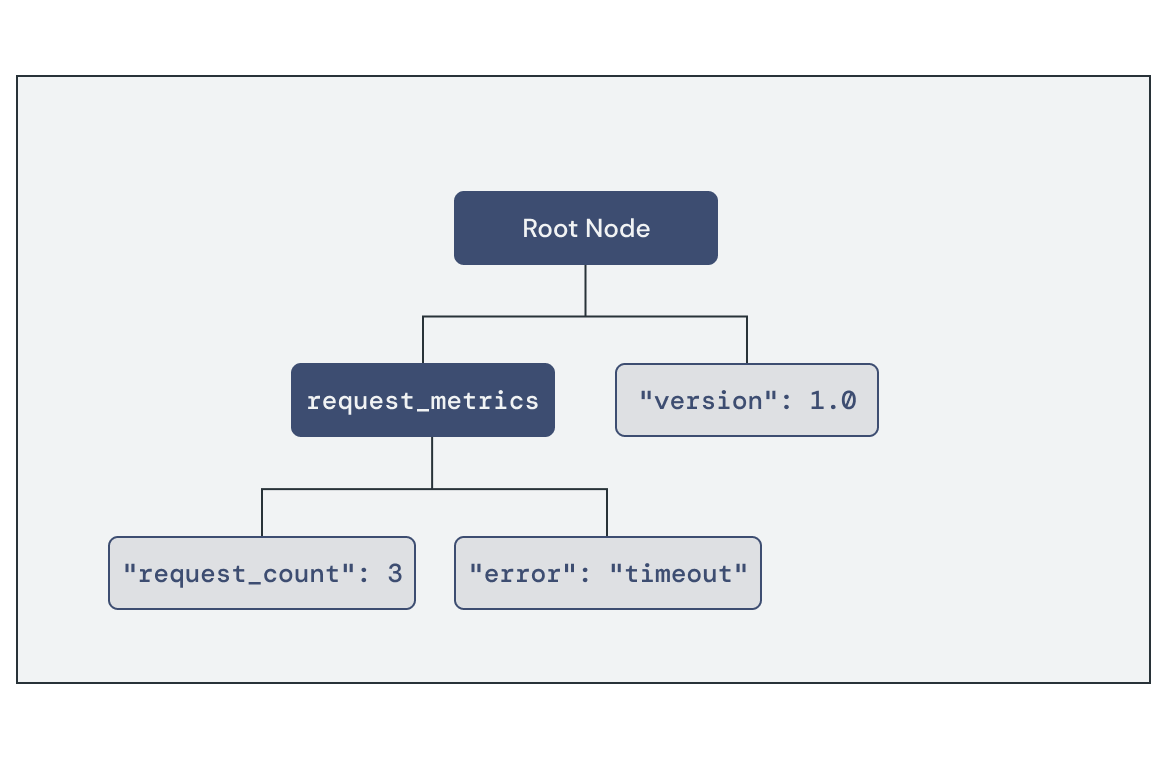
您可以使用開發人員工具,擷取目前發布至 Inspect 的指標集:
ffx inspect:可讓您使用元件選取器,以互動方式查詢檢查狀態。這有助於在開發期間偵錯元件。ffx target snapshot:擷取整個系統的偵錯快照封存檔,其中包含 JSON 格式的檢查資料。
ffx inspect show core/foo-examplecore/foo-example:
metadata:
filename = fuchsia.inspect.Tree
component_url = fuchsia-pkg://fuchsia.com/foo-example#meta/foo-example.cm
timestamp = 55457379176
payload:
root:
version = 1.0
request_metrics:
request_count = 3
error = timeout
練習:監控供應商元件
在本節中,您將使用診斷工具監控 Echo 伺服器元件的健康狀態和行為。
啟動模擬器
如果沒有正在執行的執行個體,請啟動模擬器:
啟動新的模擬器執行個體:
ffx emu start --headless啟動完成後,模擬器會輸出下列訊息並傳回:
Logging to "$HOME/.local/share/Fuchsia/ffx/emu/instances/fuchsia-emulator/emulator.log"
Waiting for Fuchsia to start (up to 60 seconds)........
Emulator is ready.
啟動套件伺服器,讓模擬器載入軟體套件:
fx serve
監控 FIDL 流量
您可以使用 fidlcat 監控及偵錯元件中的 FIDL 連線。啟動 ffx debug fidl 並設定監控 echo 伺服器元件:
ffx debug fidl --remote-name echo_server.cmChecking for debug agent on [fe80::d6c5:4526:c282:fb6%qemu]:2345.
Debug agent not found. Starting one.
INFO: [main.cc(238)] Connected to symbol server gs://fuchsia-artifacts-release/debug
INFO: [main.cc(122)] Connecting to port 2345 on fe80::d6c5:4526:c282:fb6%qemu...
INFO: [main.cc(92)] Connected!
啟動 Echo 用戶端執行個體,以啟動與伺服器的 FIDL 連線:
ffx component start /core/ffx-laboratory:echo-realm/echo_client用戶端會繫結至伺服器元件,並使用 Echo FIDL 通訊協定進行通訊。查看 ffx debug fidl 輸出內容,瞭解 Echo 伺服器處理的 FIDL 交易清單:
Monitoring echo_server.cm

echo_server.cm 58694:58696 zx_channel_read_etc(handle: handle = fb9b5273, options: uint32 = 0, num_bytes: uint32 = 512, num_handles: uint32 = 4)
  -> ZX_OK
    received request fuchsia.io/Directory.Open = { flags: uint32 = 3, mode: uint32 = 493, path: string = "svc/fidl.examples.routing.echo.Echo", object: handle = Channel:f93b597b(ZX_RIGHT_TRANSFER | ZX_RIGHT_READ | ZX_RIGHT_WRITE | ZX_RIGHT_SIGNAL | ZX_RIGHT_SIGNAL_PEER | ZX_RIGHT_WAIT | ZX_RIGHT_INSPECT)(channel:0:svc/fidl.examples.routing.echo.Echo) }

echo_server.cm 58694:58696 zx_channel_read_etc(handle: handle = Channel:f93b597b(channel:0:svc/fidl.examples.routing.echo.Echo), options: uint32 = 0, num_bytes: uint32 = 512, num_handles: uint32 = 4)
  -> ZX_OK
    received request fidl.examples.routing.echo/Echo.EchoString = { value: string = "Hello, Fuchsia" }

echo_server.cm 58694:58696 zx_channel_write_etc(handle: handle = Channel:f93b597b(channel:0:svc/fidl.examples.routing.echo.Echo), options: uint32 = 0)
  sent response fidl.examples.routing.echo/Echo.EchoString = { response: string = "Hello, Fuchsia" }
  -> ZX_OK

echo_server.cm 58694:58696 zx_channel_read_etc(handle: handle = Channel:f93b597b(channel:0:svc/fidl.examples.routing.echo.Echo), options: uint32 = 0, num_bytes: uint32 = 512, num_handles: uint32 = 4)
  -> ZX_ERR_PEER_CLOSED

echo_server.cm 58694:58696 zx_handle_close(handle: handle = Channel:f93b597b(channel:0:svc/fidl.examples.routing.echo.Echo))
  -> ZX_OK
請注意事件順序:
- 通訊協定實作的管道會在
svc/fidl.examples.routing.echo.Echo開啟。 - 伺服器會透過開啟的管道接收
Echo.EchoString要求,其中包含用戶端傳送的字串酬載。 - 伺服器會傳送相應的回應,並包含相同的字串酬載。
- 頻道隨即關閉。
fidlcat 可追蹤元件之間的 FIDL 連線,協助您找出並診斷潛在問題,例如連線失敗或無效的資料酬載。
新增要求追蹤
您可以發布元件的診斷資訊,協助進行偵錯。您將使用 Inspect API 追蹤回音伺服器元件的部分用量統計資料。
更新 echo_server 請求處理常式,接受包含請求數和處理位元組數的新結構體。處理常式會在每個傳入要求中遞增這些屬性:
荒漠油廠
echo-server/src/main.rs:
// Inspect properties managed by the server
struct EchoConnectionStats {
    total_requests: fuchsia_inspect::UintProperty,
    bytes_processed: fuchsia_inspect::UintProperty,
}

// Handler for incoming service requests
async fn handle_echo_request(mut stream: EchoRequestStream, stats: &EchoConnectionStats) {
    while let Some(event) = stream.try_next().await.expect("failed to serve echo service") {
        let EchoRequest::EchoString { value, responder } = event;
        responder.send(value.as_ref().map(|s| &**s)).expect("failed to send echo response");

        if let Some(message) = value {
            // Update Inspect property values
            stats.total_requests.add(1);
            stats.bytes_processed.add(message.len() as u64);
        }
    }
}
C++
echo-server/main.cc:
struct EchoConnectionStats {
  inspect::UintProperty bytes_processed;
  inspect::UintProperty total_requests;
};

// Handler for incoming service requests
class EchoImplementation : public fidl::examples::routing::echo::Echo {
public:
  void EchoString(fidl::StringPtr value, EchoStringCallback callback) override {
    stats_->total_requests.Add(1);
    stats_->bytes_processed.Add(value->size());
    callback(std::move(value));
  }
  fidl::examples::routing::echo::Echo_EventSender* event_sender_;
  std::unique_ptr<EchoConnectionStats> stats_;
};
在 main() 中新增下列程式碼,初始化 Inspect 屬性並傳遞至更新後的處理常式:
荒漠油廠
echo-server/src/main.rs:
async fn main() -> Result<(), anyhow::Error> {
    // ...

    // Component is serving and ready to handle incoming requests
    component::health().set_ok();

    // Create request tracking properties
    let root_node = component::inspector().root();
    let stats = EchoConnectionStats {
        total_requests: root_node.create_uint("total_requests", 0),
        bytes_processed: root_node.create_uint("bytes_processed", 0),
    };

    // Attach request handler for incoming requests
    service_fs
        .for_each_concurrent(None, |request: IncomingRequest| async {
            match request {
                IncomingRequest::Echo(stream) => handle_echo_request(stream, &stats).await,
            }
        })
        .await;

    Ok(())
}
C++
echo-server/main.cc:
int main(int argc, const char** argv) {
  // ...

  // Serve the Echo protocol
  EchoImplementation echo_instance;
  fidl::Binding<fidl::examples::routing::echo::Echo> binding(&echo_instance);
  echo_instance.event_sender_ = &binding.events();

  // Create request tracking properties
  inspect::Node& root_node = inspector.root();
  auto total_requests = root_node.CreateUint("total_requests", 0);
  auto bytes_processed = root_node.CreateUint("bytes_processed", 0);
  echo_instance.stats_ = std::make_unique<EchoConnectionStats>(EchoConnectionStats{
    std::move(bytes_processed),
    std::move(total_requests),
  });

  fidl::InterfaceRequestHandler<fidl::examples::routing::echo::Echo> handler =
      [&](fidl::InterfaceRequest<fidl::examples::routing::echo::Echo> request) {
        binding.Bind(std::move(request));
      };
  context->outgoing()->AddPublicService(std::move(handler));

  // ...
}
最後,更新匯入項目,加入新的檢查程式庫:
荒漠油廠
echo-server/src/main.rs:
use anyhow::{self, Context};
use fidl_fidl_examples_routing_echo::{EchoRequest, EchoRequestStream};
use fuchsia_component::server::ServiceFs;
use fuchsia_inspect::{component, health::Reporter};
use fuchsia_inspect::NumericProperty;
use futures::prelude::*;
C++
echo-server/main.cc:
#include <fidl/examples/routing/echo/cpp/fidl.h>
#include <lib/async-loop/cpp/loop.h>
#include <lib/async-loop/default.h>
#include <lib/fidl/cpp/binding.h>
#include <lib/inspect/cpp/inspect.h>
#include <lib/sys/cpp/component_context.h>
#include <lib/inspect/component/cpp/component.h>
再次執行 fx build,重建元件:
fx build驗證檢查資料
停止目前的 echo-server 元件執行個體。這樣一來,元件下次啟動時,就能從套件伺服器解析最新版本。
ffx component stop /core/ffx-laboratory:echo-realm/echo_server多次執行 echo 用戶端元件。這會導致 echo-server 中的要求計數在每次連線時遞增:
ffx component start /core/ffx-laboratory:echo-realm/echo_clientffx component start /core/ffx-laboratory:echo-realm/echo_clientffx component start /core/ffx-laboratory:echo-realm/echo_client
使用 ffx inspect 查看 echo 伺服器元件的可用檢查資料。您會在 root 節點下方的樹狀結構中,看到要求計數和處理的位元組值,以及元件健康狀態:
ffx inspect show 'core/ffx-laboratory\:echo-realm/echo_server'core/ffx-laboratory\:echo-realm/echo_server:
metadata:
filename = fuchsia.inspect.Tree
component_url = #meta/echo_server.cm
timestamp = 1476246046122
payload:
root:
bytes_processed = 42
total_requests = 3
fuchsia.inspect.Health:
start_timestamp_nanos = 1467828507317
status = OK
使用 Inspect 發布健康狀態和行為資訊,即可觀察元件的目前狀態,並診斷生產裝置上的問題。
終止執行個體
使用下列指令清理 echo-realm 執行個體:
ffx component destroy /core/ffx-laboratory:echo-realm後續步驟
恭喜!您已使用 FIDL 成功建構 Fuchsia IPC 介面,並使用該介面連結兩個元件。
您已完成本課程的所有單元!進一步瞭解: