

整合測試情境涉及兩個以上在同一領域運作並交換功能的元件。雖然大多數測試都是單元測試,只涵蓋單一元件,但整合測試情境需要定義領域拓撲和能力路徑。
整合測試執行器架構
整合測試元件會納入與支援的語言專屬測試架構相符的測試執行元件工具分片,藉此與 Test Runner Framework 整合。
荒漠油廠
include: [
    "//src/sys/test_runners/rust/default.shard.cml",
    "syslog/client.shard.cml",
],

// Information about the program to run.
program: {
    // The binary to run for this component.
    binary: "bin/echo_integration_test_rust",
},
C++
include: [
    "//src/sys/test_runners/gtest/default.shard.cml",
    "inspect/offer.shard.cml",
    "syslog/client.shard.cml",
],

// Information about the program to run.
program: {
    // The binary to run for this component.
    binary: "bin/echo_integration_test_cpp",
},
這個分片提供兩項重要元素:
- 公開
fuchsia.test.Suite通訊協定,架構必須使用這個通訊協定,才能探索及執行測試案例。 - 將程式
runner設為指定測試架構提供的測試執行元件。
測試領域拓撲
整合測試元件會以自身做為父項,宣告測試領域的拓撲。這樣一來,測試控制器就能負責在受測元件及其依附元件之間,進行能力轉送。
以下是整合測試 echo_server 元件的拓撲範例:
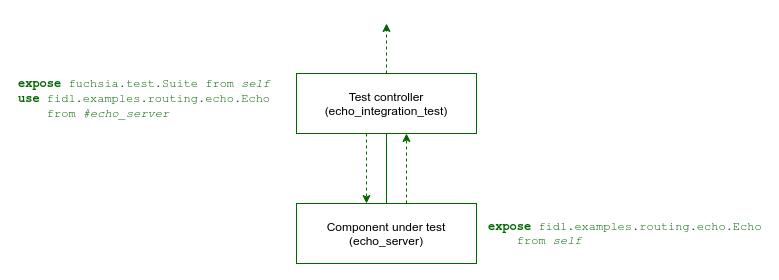
這是簡單的測試領域,會繫結至 echo_server 元件公開的 fidl.examples.routing.echo.Echo 通訊協定。echo_integration_test 套件包含下列元件:
- echo_integration_test - 測試控制器元件
- echo_server - 受測元件
您可以透過下列方式定義測試領域拓撲:
請參考下表,判斷哪種方法最適合整合測試:
| 整合測試案例 | Realm Builder | 靜態 CML |
|---|---|---|
| 使用靜態依附元件進行簡單的整合測試 | ||
| 每個測試案例的專屬元件例項 | ||
| 受測元件的生命週期會繫結至每個測試案例 | ||
| 受測元件的動態虛擬、模擬和虛設常式執行個體 | ||
| 測試案例之間的動態路徑和設定 |
Realm Builder
如果需要在執行階段定義領域拓撲,或將元件替換為本機模擬實作項目,您可以使用 Realm Builder 程式庫,在測試程式碼中動態建立拓撲。
測試控制器元件的資訊清單包含 Realm Builder 程式庫,方法是使用元件資訊清單分片:
荒漠油廠
include: [
    "sys/component/realm_builder.shard.cml",
    // ...
],
C++
include: [
    "sys/component/realm_builder.shard.cml",
    // ...
],
測試控制器程式碼會建構測試領域拓撲,將 echo_server 新增為子項元件,並向父項宣告必要的能力路徑:
荒漠油廠
use {
    // ...
    fuchsia_component_test::{
        Capability, ChildOptions, LocalComponentHandles, RealmBuilder, Ref, Route,
    },
    futures::{StreamExt, TryStreamExt},
};

// ...

let builder = RealmBuilder::new().await?;

// Add component to the realm, which is fetched using a URL.
let echo_server = builder
    .add_child(
        "echo_server",
        "fuchsia-pkg://fuchsia.com/realm-builder-examples#meta/echo_server.cm",
        ChildOptions::new(),
    )
    .await?;

builder
    .add_route(
        Route::new()
            .capability(Capability::protocol_by_name("fidl.examples.routing.echo.Echo"))
            .from(&echo_server)
            .to(Ref::parent()),
    )
    .await?;
C++
#include <lib/sys/component/cpp/testing/realm_builder.h>

// ...

RealmBuilder builder = RealmBuilder::Create();

// Add component server to the realm, which is fetched using a URL.
builder.AddChild("echo_server",
                 "fuchsia-pkg://fuchsia.com/realm-builder-examples#meta/echo_server.cm");

builder.AddRoute(Route{.capabilities = {Protocol{.name = "fidl.examples.routing.echo.Echo"}},
                       .source = ChildRef{"echo_server"},
                       .targets = {ParentRef()}});
測試控制器程式碼會透過所建立領域公開的功能與 echo_server 互動:
荒漠油廠
let realm = builder.build().await?;

let echo: fecho::EchoProxy = realm.root.connect_to_protocol_at_exposed_dir()?;
assert_eq!(echo.echo_string(Some("hello")).await?, Some("hello".to_owned()));
C++
RealmRoot realm = builder.Build(dispatcher());

zx::result<fidl::ClientEnd<fidl_examples_routing_echo::Echo>> client_end =
    realm.component().Connect<fidl_examples_routing_echo::Echo>();
ASSERT_FALSE(client_end.is_error()) << client_end.status_string();
fidl::SyncClient echo_client(std::move(*client_end));

fidl::Result<::fidl_examples_routing_echo::Echo::EchoString> result =
    echo_client->EchoString({"hello"});
ASSERT_EQ(result->response(), "hello");
如要瞭解如何使用 Realm Builder 導入測試的完整詳細資料,請參閱 Realm Builder 開發人員指南。
元件資訊清單
如果測試中的所有元件都是靜態元件,您可以使用測試控制器元件資訊清單中的 CML,以宣告方式定義測試領域的整個拓撲。
測試控制器元件的資訊清單會靜態宣告受測的 echo_server 元件為子項,並將必要功能路徑傳回父項:
荒漠油廠
{
    include: [
        "//src/sys/test_runners/rust/default.shard.cml",
        "syslog/client.shard.cml",
    ],

    // Information about the program to run.
    program: {
        // The binary to run for this component.
        binary: "bin/echo_integration_test_rust",
    },


    // Child components orchestrated by the integration test.
    children: [
        {
            name: "echo_server",
            url: "#meta/echo_server.cm",
        },
    ],

    // Capabilities used by this component.
    use: [
        {
            protocol: [ "fidl.examples.routing.echo.Echo" ],
            from: "#echo_server",
        },
    ],

    // Capabilities required by components under test.
    offer: [
        {
            dictionary: "diagnostics",
            from: "parent",
            to: "#echo_server",
        },
    ],
}
C++
{
    include: [
        "//src/sys/test_runners/gtest/default.shard.cml",
        "inspect/offer.shard.cml",
        "syslog/client.shard.cml",
    ],

    // Information about the program to run.
    program: {
        // The binary to run for this component.
        binary: "bin/echo_integration_test_cpp",
    },


    // Child components orchestrated by the integration test.
    children: [
        {
            name: "echo_server",
            url: "#meta/echo_server.cm",
        },
    ],

    // Capabilities used by this component.
    use: [
        {
            protocol: [ "fidl.examples.routing.echo.Echo" ],
            from: "#echo_server",
        },
    ],
}
測試控制器程式碼會透過公開功能與 echo_server 互動:
荒漠油廠
use anyhow::Error;
use fidl_fidl_examples_routing_echo as fecho;
use fuchsia_component::client;

#[fuchsia::test]
async fn echo_integration_test() -> Result<(), Error> {
    const ECHO_STRING: &str = "Hello, world!";

    let echo = client::connect_to_protocol::<fecho::EchoMarker>()
        .expect("error connecting to echo server");
    let out = echo.echo_string(Some(ECHO_STRING)).await.expect("echo_string failed");

    assert_eq!(ECHO_STRING, out.unwrap());
    Ok(())
}
C++
#include <fidl/examples/routing/echo/cpp/fidl.h>
#include <lib/fidl/cpp/string.h>
#include <lib/sys/cpp/component_context.h>

#include <string>

#include <gtest/gtest.h>

TEST(EchoIntegrationTest, TestEcho) {
  ::fidl::examples::routing::echo::EchoSyncPtr echo_proxy;
  auto context = sys::ComponentContext::Create();
  context->svc()->Connect(echo_proxy.NewRequest());

  ::fidl::StringPtr request("Hello, world!");
  ::fidl::StringPtr response = nullptr;
  ASSERT_TRUE(echo_proxy->EchoString(request, &response) == ZX_OK);
  ASSERT_TRUE(request == response);
}
測試套件
受測的所有元件都包含在同一個密封測試套件中。 這樣一來,您就能在不同環境中執行及更新測試,不必擔心依附元件不同步。
請參閱下列 BUILD.gn 檔案,瞭解如何為這個範例定義 fuchsia_test_package() 目標:
荒漠油廠
rustc_test("bin") {
  name = "echo_integration_test_rust"
  edition = "2024"

  deps = [
    "//examples/components/routing/fidl:echo_rust",
    "//src/lib/fuchsia",
    "//src/lib/fuchsia-component",
    "//third_party/rust_crates:anyhow",
  ]

  sources = [ "src/lib.rs" ]
}


fuchsia_component("echo_integration_test_component") {
  testonly = true
  component_name = "echo_integration_test"
  manifest = "meta/echo_integration_test.cml"
  deps = [ ":bin" ]
}


fuchsia_test_package("echo_integration_test_rust") {
  test_components = [ ":echo_integration_test_component" ]
  deps = [ "//examples/components/routing/rust/echo_server:echo_server_cmp" ]
}
C++
executable("bin") {
  output_name = "echo_integration_test_cpp"
  sources = [ "echo_integration_test.cc" ]
  deps = [
    "//examples/components/routing/fidl:echo_hlcpp",
    "//sdk/lib/async-loop:async-loop-cpp",
    "//sdk/lib/async-loop:async-loop-default",
    "//sdk/lib/sys/cpp",
    "//sdk/lib/sys/cpp/testing:unit",
    "//src/lib/fxl/test:gtest_main",
    "//third_party/googletest:gtest",
  ]
  testonly = true
}


fuchsia_component("echo_integration_test_component") {
  testonly = true
  component_name = "echo_integration_test"
  manifest = "meta/echo_integration_test.cml"
  deps = [ ":bin" ]
}


fuchsia_test_package("echo_integration_test_cpp") {
  test_components = [ ":echo_integration_test_component" ]
  deps = [ "//examples/components/routing/cpp/echo_server:echo_server_cmp" ]
}
使用下列變數將元件建構至 fuchsia_test_package() 中:
test_components:內含測試的元件,可公開fuchsia.test.Suite通訊協定。deps:整合測試所需的額外元件依附元件。
詳情請參閱「測試套件 GN 範本」。
測試元件路徑名稱
元件的路徑名稱會識別元件拓撲中的專屬例項。
對於在測試拓撲中執行的元件,路徑名稱路徑是相對於測試領域中的根元件。在上述範例中,根元件是公開 fuchsia.test.Suite 通訊協定的測試控制器元件。
子項路徑名稱格式取決於測試領域拓撲:
- 靜態 CML:靜態宣告為根測試控制器子項的元件,只需透過元件
name即可識別。 - Realm Builder:Realm Builder 會在測試控制器和子項元件之間導入中繼集合。如要進一步瞭解 Realm Builder 的測試元件別名,請參閱 Realm Builder 開發人員指南。