

| RFC-0210:虛擬化功能轉送 | |
|---|---|
| 狀態 | 已接受 |
| 區域 |
|
| 說明 | 定義虛擬化功能在平台和產品之間的路由方式。 |
| 問題 | |
| Gerrit 變更 | |
| 作者 | |
| 審查人員 | |
| 提交日期 (年-月-日) | 2022-11-07 |
| 審查日期 (年-月-日) | 2023-02-23 |
摘要
本文說明如何將建立虛擬機器的功能導向產品工作階段。因此,本文也會說明 Fuchsia 平台中包含的虛擬化功能和 API 組合,以及產品提供的元件。
提振精神
目前 Fuchsia 核心平台提供所有虛擬化元件,包括:
- 用於模擬虛擬機器和虛擬裝置的元件
- 提供特定客體作業系統二進位檔的套件
- 將訪客專屬功能與產品整合的元件
這項做法有幾個明顯缺點。將所有來賓專屬元件放在平台中,可避免產品以產品專屬方式整合虛擬化。此外,許多訪客會保留狀態並持有使用者資料,我們需要確保這些使用者資料與所有其他使用者資料一樣經過加密並受到保護。本文介紹的設計與產品無關,但許多設計都會考量工作站產品的需求,做為激勵範例。
本提案的明確目標是將虛擬化功能做為 Fuchsia 平台功能提供。也就是說,我們會向產品工作階段公開一組功能,讓產品運用虛擬化機制,而不必將虛擬化所需的所有低階權限功能都傳送至工作階段本身。這部分是根據 RFC-0092 - Sessions 和 RFC-0194 - Addendum: Sessions 中的指引。詳情請參閱「安全性考量」。
利害關係人
誰會受到這項 RFC 是否通過的影響?(這個部分為選填,但建議填寫)。
協助人員:
由 FEC 指派,負責在 RFC 程序中引導此 RFC 的人員。
審查者:
- abdulla
- alerad
- dahastin
- jsankey
- aaronwood
- ypomortsev
已諮詢:
列出應審查 RFC 的人員,但不必取得他們的核准。
公共平台:
這項計畫的草案已在虛擬化、元件架構和安全性的相關人員之間傳閱。
詞彙解釋
- 虛擬機器管理員 (vmm):負責模擬及驅動虛擬機器的元件。
- 虛擬裝置:負責模擬單一裝置的元件 (例如區塊、網路等)。
- vsock:半虛擬化通訊端裝置,可讓訪客和主機之間建立零設定通訊端連線。通常用做訪客的控制層。
背景
Fuchsia 上的虛擬機器是由 vmm (虛擬機器管理員) 元件驅動。vmm 元件本身會管理多個實作虛擬裝置的子元件 (例如 virtio_block.cm、virtio_net.cm 等),但本文會將整個元件群組簡稱為 vmm。vmm會為虛擬機器提供基本資源 (記憶體、vCPU) 和虛擬裝置。vmm 元件與客體無關,且沒有任何客體 OS 專屬邏輯。每個 vmm 元件執行個體都由特定於客層 OS 的 GuestManager 元件管理,例如 TerminaGuestManager。GuestManager。包含房客生命週期和任何房客專屬服務或功能的高階邏輯。GuestManager 負責提供所有啟動資源 (核心、RAM 磁碟、區塊裝置等) 和訪客設定,例如要提供的裝置、虛擬 CPU 數量或記憶體容量。
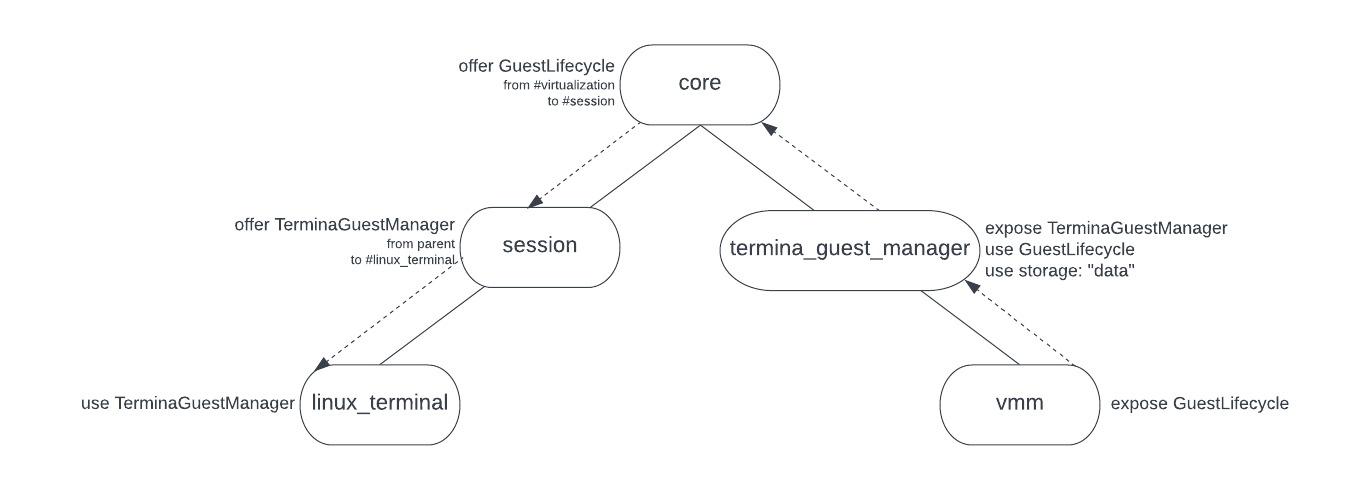
目前,Fuchsia 支援的每個客體作業系統,都是完全使用靜態元件路徑建模。舉例來說,TerminaGuestManager 元件 (工作站上 Linux 終端機的支援客層) 具有核心分片提供的靜態子項 vmm 元件。有些路徑可讓工作階段中的 Linux 終端機元件連線至核心領域的 TerminaGuestManager,有些路徑則可讓訪客在圖形介面殼層中建立視窗 (使用 virtio-wayland)。
儲存空間
GuestManager 元件負責開啟 vmm 需要的所有檔案和裝置;vmm 本身只會接收檔案、區塊裝置或其他有狀態功能的控制代碼。TerminaGuestManager 會在 CFv2 data 儲存空間能力提供的目錄中建立檔案,藉此初始化具狀態的分區。其他唯讀有狀態分割區是透過開啟 TerminaGuestManager 套件本身所含圖片的 blob 檔案提供。
由於 TerminaGuestManager 是核心領域中的元件,因此提供給該元件的 data 儲存空間能力也來自核心領域。這表示在工作站等產品上,即使可能含有敏感的使用者資料,客層資料儲存空間也不會位於根據使用者驗證因素加密的獨立帳戶磁碟區。此外,如果我們想像一個多使用者系統,在核心領域中擁有單一元件,就表示單一 vmm 執行個體和資料會跨所有帳戶共用,這並非可行的解決方案。
設計
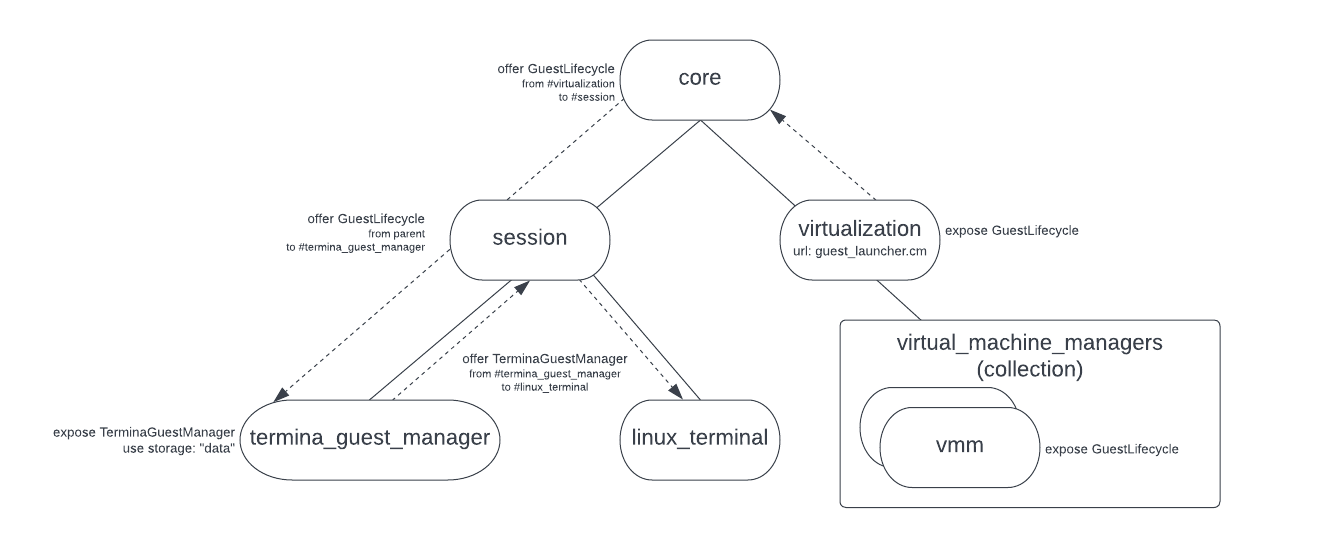
由於 vmm 元件需要多項具備特殊權限的功能,因此最好將其保留在核心中。此外,由於 vmm 提供啟動虛擬機器的機制,因此 vmm 中沒有產品專屬的政策或行為。從核心中擷取 GuestManager 元件是理想做法,因為這些是產品專屬套件,可帶來只與特定產品相關的邏輯和客體作業系統。將這些元件移出 core 後,產品就能自由自訂虛擬化整合方式,不必處理虛擬機器模擬的低階詳細資料。
我們將推出新的核心分片,讓工作階段在 CFv2 集合中建立元件執行個體,但任何狀態都必須由用戶端提供及管理。vmm屆時,您將可使用能力轉送啟動虛擬機器,而不必使用每個 GuestManager 元件的靜態子項 vmm.cm。這樣一來,我們就能將 GuestManager 元件移至工作階段,而不必將 VMM 本身也移至工作階段。換句話說,我們會保留 vmm,也就是與產品和訪客無關的 core,並將產品專屬的 GuestManagers 移至工作階段。
為此,我們將推出新的 VmmLauncher 元件,用於處理建立 vmm 元件。這個元件會公開與 vmm 公開的 GuestLifecycle 通訊協定相同的通訊協定。不同之處在於,VmmLauncher 會為每個 GuestLifecycle 連線建立新的 vmm 執行個體,並將 FIDL 管道的伺服器端轉送至新元件,而不是直接實作 GuestLifecycle。GuestLifecycle 通訊協定用於初始化 VM,然後開始執行。
/// The guest control plane allows for creating, starting, and stopping the guest.
protocol GuestLifecycle {
    /// Create a VMM configured with the provided config. This instantiates all
    /// devices and loads the kernel without starting the VCPU or device dispatch
    /// loops.
    ///
    /// `Create` must not be called after a call to `Run` until `Stop` is called.
    /// Once a guest has been stopped with a call to `Stop`, then `Create` may be
    /// called again to re-initialize the guest.
    Create(resource struct {
        guest_config GuestConfig;
    }) -> (struct {}) error GuestError;

    /// Binds to the Guest protocol for an initialized guest.
    ///
    /// This operation must be called between `Create` and `Stop`, otherwise
    /// the provided channel will be immediately closed.
    Bind(resource struct {
        guest server_end:Guest;
    }) -> (struct {}) error GuestError;

    /// Start the VCPU and device dispatch loops. This will not return until the
    /// dispatch loops exit. On a clean shutdown (either guest or client initiated)
    /// this will return success.
    ///
    /// If forced to stop by the guest manager calling stop, a SHUTDOWN_FORCED
    /// error will be returned. This will also return any runtime error that forces
    /// the guest to stop.
    ///
    /// `Run` must only be called after a call to `Create`. Once a guest is stopped with
    /// a call to `Stop`, then `Run` may not be called again until `Create` is called
    /// to re-initialize the guest. Notably, we do not support calling `Stop`
    /// and then `Run` directly; the call to `Create` after `Stop` is a requirement.
    Run() -> (struct {}) error GuestError;

    /// Stop a running VMM. Returns once the dispatch loops have stopped. After
    /// Stop returns, `Create` and then `Run` can be called again.
    Stop() -> ();
};

type GuestError = strict enum {
    /// Catch all VMM error.
    INTERNAL_ERROR = 1;

    /// A device endpoint was requested via the guest client API, but the device isn't enabled.
    DEVICE_NOT_PRESENT = 2;

    /// The config failed VMM validation for reasons such as a missing required field.
    BAD_CONFIG = 3;

    /// The VMM failed to initialize the guest object, usually due to capability routing issues
    /// or memory layout problems.
    GUEST_INITIALIZATION_FAILURE = 4;

    /// The VMM failed to initialize a device.
    DEVICE_INITIALIZATION_FAILURE = 5;

    /// The VMM failed to start a device, usually because the device component returned a failure.
    DEVICE_START_FAILURE = 6;

    /// Two or more devices have attempted to register overlapping memory ranges.
    DEVICE_MEMORY_OVERLAP = 7;

    /// Failed to connect to a required service. Check the routing in the manifest.
    FAILED_SERVICE_CONNECT = 8;

    /// Failed to add a public service.
    DUPLICATE_PUBLIC_SERVICES = 9;

    /// General error when loading the guest kernel.
    KERNEL_LOAD_FAILURE = 10;

    /// Error when starting a VCPU.
    VCPU_START_FAILURE = 11;

    /// A VCPU encountered a fatal error while running.
    VCPU_RUNTIME_FAILURE = 12;

    /// The VMM was asked to run before it was created.
    NOT_CREATED = 13;

    /// A VMM is already running. The VMM must be stopped and a new VMM must be created before it
    /// can be run again.
    ALREADY_RUNNING = 14;

    /// A running VMM was forced to stop by the VMM controller.
    CONTROLLER_FORCED_HALT = 15;
};
用戶端可設定的參數集會納入 GuestConfig FIDL 表格。這項功能可讓您設定機器形狀 (vCPU 和記憶體),以及可用的虛擬裝置。
type GuestConfig = resource table {
    /// Type of kernel to load.
    1: kernel_type KernelType;
    /// File to load the kernel from.
    2: kernel client_end:fuchsia.io.File;
    /// File to load the initial RAM disk from.
    3: ramdisk client_end:fuchsia.io.File;
    /// File to load the dtb overlay for a Linux kernel from.
    4: dtb_overlay client_end:fuchsia.io.File;
    /// Kernel command-line to use.
    5: cmdline string:MAX;
    /// Additional kernel command-lines to append to the main command-line.
    6: cmdline_add vector<string:MAX>:MAX;
    /// The number of CPUs to provide to a guest.
    7: cpus uint8;
    /// Amount of guest memory required, in bytes. This value may be rounded up
    /// depending on the system configuration.
    8: guest_memory uint64;
    /// A list of block devices to give a guest. Cannot be changed from the
    /// command-line.
    9: block_devices vector<BlockSpec>:MAX_BLOCK_DEVICES;
    /// A list of specifications for network devices.
   10: net_devices vector<NetSpec>:MAX_NET_DEVICES;
    /// Optional virtio-wl device.
   11: wayland_device WaylandDevice;
    /// Optional virtio-magma device.
   12: magma_device MagmaDevice;
    /// Whether to add a default network device.
   13: default_net bool;
    /// Enable virtio-balloon.
   14: virtio_balloon bool;
    /// Enable virtio-console.
   15: virtio_console bool;
    /// Enable virtio-gpu.
   16: virtio_gpu bool;
    /// Enable virtio-rng.
   17: virtio_rng bool;
    /// Enable virtio-vsock.
   18: virtio_vsock bool;
    /// Enable virtio-sound.
   19: virtio_sound bool;
    /// Enable input streams (capture) for virtio-sound.
   20: virtio_sound_input bool;
    /// Host ports to listen for guest initiated vsock connections on. This can be
    /// used for simplicity if a Listener is known at config creation time, or if a
    /// Listener must be available at the moment of guest creation for timing
    /// reasons.
    /// To add a Listener after a guest starts, see HostVsockEndpoint::Listen.
   21: vsock_listeners vector<Listener>:MAX;
};
Guest 通訊協定可讓您從 VM 存取執行階段服務。
/// A `Guest` provides access to services of a guest instance.
protocol Guest {
    /// Get a guest console.
    ///
    /// The details regarding what output is produced and what input is accepted
    /// are determined by each guest, but will typically be a read/write socket
    /// with a shell.
    ///
    /// Returns ZX_ERR_UNAVAILABLE if the guest has no configured console.
    GetConsole() -> (resource struct {
        socket zx.handle:SOCKET;
    }) error zx.status;

    /// Get the socket for low-level guest debug logs.
    ///
    /// The details regarding what output is produced and what input is accepted
    /// are determined by each guest, but will typically be a read-only socket
    /// with the guest kernel's serial logs.
    GetSerial() -> (resource struct {
        socket zx.handle:SOCKET;
    }) error zx.status;

    /// Get the vsock endpoint for the guest.
    ///
    /// This endpoint can be used to register listeners for guest initiated
    /// connections, and to initiate connections from a client. If listeners need
    /// to be registered before the guest starts so that they are immediately
    /// available, set them via the `GuestConfig` instead of using this protocol.
    ///
    /// Returns error VSOCK_NOT_PRESENT if the guest was started without a vsock
    /// device.
    GetHostVsockEndpoint(resource struct {
        endpoint server_end:HostVsockEndpoint;
    }) -> (struct {}) error GuestError;

    /// Get the balloon controller endpoint for the guest.
    ///
    /// Returns error BALLOON_NOT_PRESENT if the guest was started without a
    /// balloon device.
    GetBalloonController(resource struct {
        controller server_end:BalloonController;
    }) -> (struct {}) error GuestError;
};
實作
我們將在核心中實作 VmmLauncher,並使用名為 vmm_launcher.cm 的元件。這個元件會管理 CFv2 集合,並啟動 vmm 元件。接著,系統會更新 GuestManager 元件,從 "parent" 存取 GuestLifecycle 能力,而不是透過靜態子項存取。vmm_launcher.cm 會在 CFv2 元件階層的 /core/virtualization 中,透過核心分片提供。我們選擇將此公開為 virtualization 分片,因為支援虛擬化的任何產品都會使用此分片。
接著,我們會將 GuestLifecycle 通訊協定公開給產品工作階段,並更新工作站產品工作階段,加入 TerminaGuestManager。
工具、診斷和開發人員人體工學
我們需要維持在核心產品上執行客體作業系統的能力。目前是使用手動新增至建構作業的額外核心分片 (透過 GN 引數) 來完成這項作業。每個核心分片都支援單一訪客。這項提案並未要求變更運作方式,但由於 VMM 和相關聯的裝置負責將大部分能力路徑導向客層管理員分片,因此可大幅簡化元件路徑。
日後,我們可能會變更啟動 GuestManager 元件的方式,以利開發。debian 或 zircon 等簡單的訪客除了 GuestLifecycle 以外,不需要任何功能,因此我們可以支援將這些元件啟動到自己的集合中,減少支援虛擬化工作流程所需的自訂核心領域分片數量。
安全性考量
vmm 需要一些具備權限的功能才能正常運作 (例如 HypervisorResource、部分 /dev 目錄)。這項設計可避免將這些具備特殊權限的功能公開給工作階段。
這項設計與先前的差異在於,我們之前提供的通訊協定代表單一 VM 執行個體 (例如:fuchsia.virtualization.TerminaGuestManager),現在則提供使用 fuchsia.virtualization.GuestManager 通訊協定建立任意數量 VM 執行個體的能力。這項能力只會透過 vmm 元件公開,我們不會允許工作階段將任意元件啟動至包含 vmm 執行個體的集合中。
只要工作階段建立的任何訪客停止運作,系統就會關閉 GuestLifecycle 管道,確保使用者工作階段停止後,訪客不會繼續運作。
為避免 vmm 執行個體之間發生狀態洩漏情形,可變動的目錄功能會動態轉送至 vmm 執行個體,而不是靜態轉送共用目錄能力。這些功能來自與每個執行個體相關聯的對應 GuestManager 元件。此外,工作階段也能以一致的方式管理及保護有狀態的 VM 資料。
說明文件
產品如何使用虛擬化技術的詳細資料,將記錄在 fuchsia.dev 虛擬化說明文件的新章節中。這包括產品工作階段可使用的 FIDL 通訊協定集,以及任何最佳做法。
測試
為了配合這項異動,所有現有的整合測試都會轉換為使用 vmm_launcher,以展示正確的功能。我們也會探索可能的模糊測試方法,驗證 vmm 執行個體不會將共用、有狀態的功能轉送。vmm_launcher
考慮的替代方案
不再需要 VmmLauncher 元件
如本文所述,vmm_launcher.cm 不會執行任何有趣的操作,只會建立集合中的元件,以回應傳入的連線要求。這項作業可由元件架構直接處理,因此我們可以移除這個元件。舉例來說,為支援這項功能,元件架構可以提供建立同質元件集合的方法。系統不會在這些集合中建立動態子項,而是會在元件連線時自動啟動。
新增自訂元件來執行這項操作並非難事,但如果這是常見模式,直接將這項操作新增至元件架構可能比較合理。
新增明確的 VmmLauncher 通訊協定
我們不必在回應現有 GuestLifecycle 通訊協定的連線時隱含建立新的 vmm 元件,而是可以建立新的具名通訊協定,用於 VmmLauncher。如果我們發現需要擴大 API 範圍,納入目前提案以外的更多功能,這個設計就相當合適。
library fuchsia.virtualization;

@discoverable
protocol VmmLauncher {
    /// Launches a new, uninitialized virtual machine. The bound
    /// `GuestLifecycle` can be used to initialize the VM and start or stop it.
    ///
    /// The VM will be stopped and the component destroyed when the
    ///`GuestLifecycle` channel is closed.
    Launch(resource struct {
        lifecycle server_end:GuestLifecycle;
    });

    /// ... other functionality ...
};
由於我們目前不需要任何額外功能,因此偏好使用現有的通訊協定集。