

本 Codelab 将引导您了解如何在 Fuchsia 平台中实现一项新功能,该功能可以根据产品或开发板配置有条件地包含和配置。
前提条件
本 Codelab 假定您熟悉以下内容:
- Fuchsia 的 源代码树和构建 系统(GN和 Bazel)。
- Rust 编程语言。
- Fuchsia 组件概念。
- 软件程序集概念(产品配置、 开发板配置、平台)。
学习内容
- 如何确定某项功能是否属于平台。
- 如何在程序集配置架构中定义功能标志。
- 如何创建和注册程序集子系统。
- 如何使用子系统 API 来包含软件包、配置和内核参数。
- 如何在产品或开发板中启用新的平台功能。
功能放置指南
平台功能始终 在 fuchsia.git 中实现,并且必须足够通用,以便可以在多个产品或开发板上启用。如果某项功能特定于单个产品或开发板,则不属于平台。
Fuchsia 平台是所有产品的核心共享基础。向平台添加特定于产品或开发板的功能会增加平台的大小和复杂性,并可能给所有其他产品带来长期维护负担。务必保持平台的通用性。
请使用以下指南来确定功能的放置位置:
平台功能:对多个产品或 开发板有用的功能。它应该是通用的且可配置的,例如新的可选网络服务,不同的产品可以选择包含和配置该服务。
产品功能:特定于一个产品的功能。这通常是最终用户可见的功能,例如构建界面的 Fuchsia 软件包,或单个产品的独特字体集。
开发板功能:特定于一个开发板硬件的功能,例如 特定硬件组件的驱动程序,或配置值 (例如 GPIO 引脚编号)该开发板特有的。
Codelab 步骤
实现平台功能涉及以下步骤:
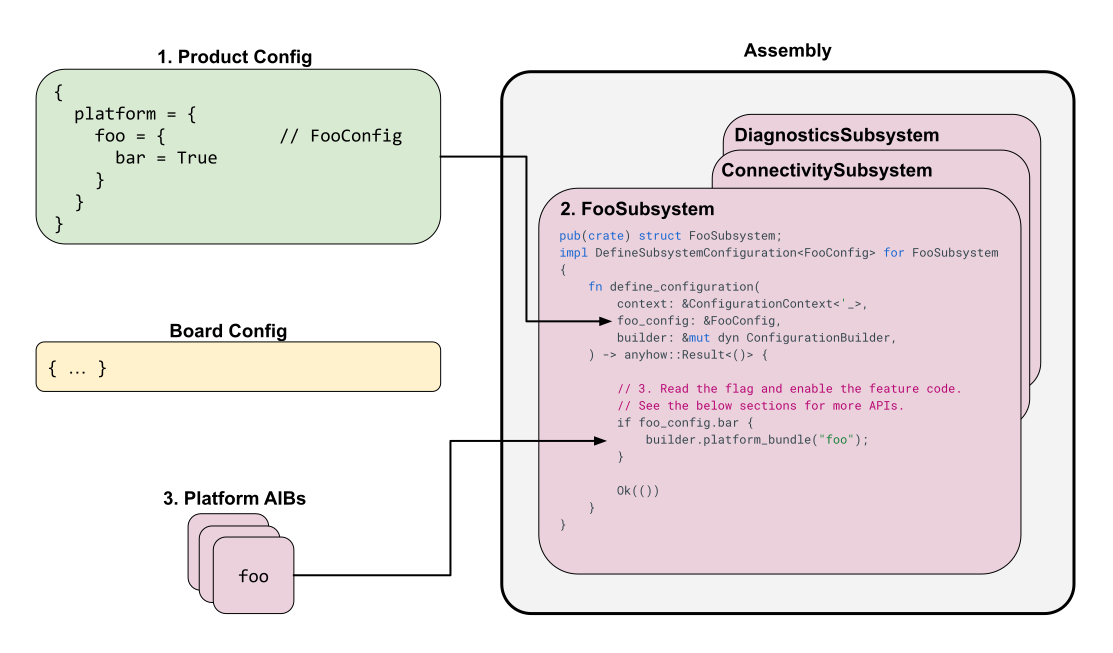
图 1. 实现平台功能并在产品配置中启用该功能。
1. 在 config_schema 中声明功能标志
平台功能通常根据产品或开发板配置中设置的标志有条件地启用。第一步是为这些标志定义架构。
所有平台功能标志都在
//src/lib/assembly/config_schema/src/platform_settings 中的 Rust 结构体中声明。每个子系统通常在此目录中都有自己的文件(例如 fonts_config.rs 或 network_config.rs)。
示例: 如需查看示例,请按以下步骤操作:
如需定义一个标志来启用假设的“Tandem”网络功能,请创建一个新文件
//src/lib/assembly/config_schema/src/platform_settings/tandem_config.rs:use serde::{Deserialize, Serialize}; /// Configuration for the Tandem networking feature. #[derive(Debug, Deserialize, Serialize, PartialEq)] #[serde(default, deny_unknown_fields)] pub struct TandemConfig { /// Enables the core Tandem service. pub enabled: bool, /// Specifies the maximum number of concurrent connections. pub max_connections: u32, } // Choose reasonable default values. impl Default for TandemConfig { fn default() -> Self { Self { enabled: false, max_connections: 10, } } }默认值的最佳实践:
- 始终在
PlatformSettings中的结构体字段上使用#[serde(default)](如后续步骤所示)。 - 为配置结构体(在本例中为
TandemConfig)实现impl Default,以定义每个字段的默认值。 - 避免在结构体上同时使用字段级
#[serde(default = "...")]和#[derive(Default)],因为这可能会导致行为不一致 。
- 始终在
将此新配置结构体添加到
//src/lib/assembly/config_schema/src/platform_settings.rs中的主PlatformSettings:// ... other imports mod tandem_config; // ... other fields pub struct PlatformSettings { // ... other fields #[serde(default)] pub tandem: tandem_config::TandemConfig, }在产品配置中,您现在可以启用此新功能。例如:
fuchsia_product_configuration(
    name = "my_product",
    product_config_json = {
        platform = {
            tandem = {
                enabled = True,
                max_connections = 20,
            },
        },
    },
)
2. 定义新的子系统
程序集子系统 是一个 Rust 模块,负责处理相关平台功能组的配置。它会读取 config_schema 中定义的标志,并使用程序集构建器 API 来包含和配置功能代码。
位置: 子系统位于
//src/lib/assembly/platform_configuration/src/subsystems 中。
如需查看示例,请按以下步骤操作:
为我们的“Tandem”功能创建一个新文件
//src/lib/assembly/platform_configuration/src/subsystems/tandem.rs:use crate::subsystems::prelude::*; use assembly_config_schema::platform_config::tandem_config::TandemConfig; pub(crate) struct TandemSubsystem; impl DefineSubsystemConfiguration<TandemConfig> for TandemSubsystem { fn define_configuration( context: &ConfigurationContext<'_>, tandem_config: &TandemConfig, builder: &mut dyn ConfigurationBuilder, ) -> anyhow::Result<()> { if tandem_config.enabled { // Actions to include the feature will go here // See Step 3 for details println!("Tandem feature enabled with max_connections: {}", tandem_config.max_connections); } Ok(()) } }说明:
- 结构体
TandemSubsystem实现DefineSubsystemConfiguration特征,并使用我们之前定义的TandemConfig结构体进行类型化。 define_configuration函数接收ConfigurationContext、我们的特定TandemConfig和ConfigurationBuilder。- 在此函数中,我们会检查
enabled标志。如果为 true,我们将使用builder将功能组件添加到系统映像。
- 结构体
将模块添加到
//src/lib/assembly/platform_configuration/src/subsystems.rs:// ... other mods mod tandem;在同一文件中的主
Subsystems::define_configuration函数内调用其define_configuration函数,并传递 平台设置的相关部分:// In Subsystems::define_configuration tandem::TandemSubsystem::define_configuration( context, &platform.tandem, builder, )?;
3. 实现子系统逻辑
在子系统的 define_configuration 函数中,您将使用 ConfigurationBuilder 方法根据功能标志将功能添加到产品。
例如,更新 tandem.rs:
use crate::subsystems::prelude::*;
use assembly_config_schema::platform_config::tandem_config::TandemConfig;
use assembly_platform_configuration::{
    ConfigurationBuilder,
    KernelArg,
    ConfigValueType,
    Config,
    PackageSetDestination,
    PackageDestination,
    FileEntry,
    BuildType
};

pub(crate) struct TandemSubsystem;
impl DefineSubsystemConfiguration<TandemConfig> for TandemSubsystem {
    fn define_configuration(
        context: &ConfigurationContext<'_>,
        tandem_config: &TandemConfig,
        builder: &mut dyn ConfigurationBuilder,
    ) -> anyhow::Result<()> {

        if tandem_config.enabled {
            // 1. Add the feature's code at build time using an Assembly Input Bundle (AIB)
            builder.platform_bundle("tandem_core");

            // 2. Set a runtime configuration value
            builder.set_config_capability(
                "fuchsia.tandem.MaxConnections",
                Config::new(ConfigValueType::Int32, tandem_config.max_connections.into()),
            )?;

            // 3. Conditionally add a runtime kernel argument based on build type
            if context.build_type == &BuildType::Eng {
                builder.kernel_arg(KernelArg::TandemEngDebug);
            }

            // 4. Include a domain config package for more complex runtime configuration
            builder.add_domain_config(PackageSetDestination::Blob(PackageDestination::TandemConfigPkg))
                  .directory("config/data")
                  .entry(FileEntry {
                      source: "//path/to/tandem/configs:default.json".into(),
                      destination: "settings.json".into(),
                  })?;
        }

        Ok(())
    }
}
构建时启用与运行时启用:
- 构建时: 仅当启用该功能时,工件才会包含在映像中。对于不需要该功能的其他产品,建议采用这种方式来节省空间、加强安全性、启用静态分析并提高性能。
- 运行时: 工件始终包含在内,但其行为在运行时受到控制(例如,通过配置值或内核参数)。
构建时间
程序集使用程序集输入软件包 (AIB) 组织构建时功能。功能所有者可以将多种类型的工件插入到单个 AIB 中,并且可以指示程序集何时以及如何将该 AIB 添加到产品。所有 AIBs
都在 //bundles/assembly/BUILD.gn 中定义。例如:
# Declares a new AIB with the name "tandem_core".
assembly_input_bundle("tandem_core") {
  # Controls which build types and feature set levels this AIB is allowed to be
  # included in. This prevents non-production code from ending up in production
  # user builds.
  # Options include:
  #   "everything" (equivalent to empty list)
  #   <build-type> (e.g. "user", "userdebug", "eng")
  #   <feature-set-level> (e.g. "standard", "utility", "bootstrap", "embeddable")
  #   <feature-set-level>::<build-type> (e.g. "standard::eng" or "utility::user")
  allowed_in = [ "standard", "utility::eng" ]

  # Include this package into the "base package set".
  # See RFC-0212 for an explanation on package sets.
  # The provided targets must be fuchsia_package().
  base_packages = [ "//path/to/my/tandem:pkg" ]

  # Include this file into BootFS.
  # The provided targets must be bootfs_files_for_assembly().
  bootfs_files_labels = [ "//path/to/my/tandem:bootfs" ]
}
访问权限控制字段:
allowed_in:(推荐)列出允许包含此 AIB 的功能集(例如standard、bootstrap)和构建类型(例如user、eng)。如果用户尝试在不正确的产品中包含 AIB,程序集将抛出错误。scrutiny_required:列出此 AIB 的内容应包含在 scrutiny golden 中的功能集和构建类型。这仅用于 scrutiny golden 生成,不会影响哪些 AIB 进入哪些产品。auto_include_in:列出此 AIB 在其中自动包含的功能集和构建类型,而无需在子系统中显式调用builder.platform_bundle()。
如需包含 AIB,您可以在 AIB 定义中使用 auto_include_in 来告知程序集自动将 AIB 包含在列出的构建类型和功能集级别中;或者,如果您需要根据开发板或产品级标志启用 AIB,则可以在子系统中使用以下方法:
builder.platform_bundle("tandem_core");
如果您添加了新的 AIB,请不要忘记将其添加到
//bundles/assembly/platform_aibs.gni中的相应列表,否则您将在构建时收到
错误,指出找不到该 AIB。
运行时
程序集支持多种类型的运行时配置。这些类型按偏好顺序列出。
配置功能:Fuchsia 组件可以在运行时读取配置 功能的值,而程序集在构建时设置这些功能的默认 值,例如:
// Add a config capability named `fuchsia.tandem.MaxConnections` to the config package.
builder.set_config_capability(
    "fuchsia.tandem.MaxConnections",
    Config::new(ConfigValueType::Int32, tandem_config.max_connections.into()),
)?;
程序集会将所有默认配置功能添加到 BootFS 中的配置软件包。
因此,您必须通过任何中间组件清单将功能从 /root 组件领域路由到目标组件。
路由平台配置功能
由于配置软件包在 /root 内实例化为 #config,因此根
清单 (//src/sys/root/root.cml) 必须向
相应的子领域(例如 #bootstrap 或 #core)提供该功能:
// In //src/sys/root/root.cml
offer: [
    {
        config: [ "fuchsia.tandem.MaxConnections" ],
        from: "#config",
        to: "#bootstrap",
    },
]
然后,任何中间领域(例如 //src/sys/bootstrap/meta/bootstrap.cml)都必须
将功能从 parent 路由到目标组件:
// In //src/sys/bootstrap/meta/bootstrap.cml
offer: [
    {
        config: [ "fuchsia.tandem.MaxConnections" ],
        from: "parent",
        to: "#tandem",
    },
]
在组件中使用平台定义的配置功能
当组件需要使用平台定义和提供的配置功能(通过子系统中的 builder.set_config_capability)时,组件的 CML 文件必须包含 use 声明。 此声明必须指定配置值的 type,即使该值由父领域提供也是如此。
示例组件 CML (my_component.cml):
{
    use: [
        {
            config: "fuchsia.tandem.MaxConnections", // The capability name
            from: "parent",
            key: "max_conn", // The key used in this component's structured config
            type: "int32",     // The type MUST be specified here
        },
    ],
    // ... other parts of the manifest
    config: {
        max_conn: { type: "int32" },
    },
}
组件代码:
您还必须更新组件的源代码,以使其在其结构化配置中包含此键。这通常涉及更新反序列化配置值的结构体,该结构体通常由
ffx component config
get
命令或类似工具生成。定义一个结构体以反序列化配置:
// Example in the component's config.rs (e.g., src/config.rs)
use serde::Deserialize;

// This struct should match the keys and types in the CML 'config' block.
#[derive(Debug, Deserialize)]
pub struct TandemComponentConfig {
    pub max_conn: i32,
    // ... other config fields
}
然后,在组件的初始化代码中,检索配置:
let config = fuchsia_component::config::Config::take_from_startup_handle();
let tandem_config: TandemComponentConfig = config.get();
要点:
type(例如"bool"、"int32"、"string")必须包含在平台提供的配置的use节中。- 如果类型为
"string",您还必须包含max_size。 use节中的key将功能映射到组件自己的config架构中的字段名称,从而映射到用于在组件代码中加载配置的结构体中的字段。- 确保更新组件的代码(例如 Rust、C++),以处理新的配置键。
网域配置:对于复杂配置、项列表或需要自定义类型的配置,网域配置比配置功能更可取。虽然通常可以将复杂配置“展平”为一组简单的键值对以用于配置功能,但这可能会变得难以管理。
例如,假设有一个组件需要网络端点列表,其中每个端点都有网址、端口和协议。使用配置功能,您可能需要将其扁平化为一系列键。例如:
// This approach is NOT recommended for lists or complex types.
"endpoint.0.url": "host1.example.com",
"endpoint.0.port": 443,
"endpoint.1.url": "host2.example.com",
"endpoint.1.port": 8080,
这会变得难以管理,尤其是在端点数量可变的情况下。在这种情况下,网域配置是一种更简洁的解决方案。您可以在软件包中提供单个 JSON 文件,组件可以在运行时解析该文件:
// A domain config file (e.g., tandem_config.json)
{
  "endpoints": [
    {
      "url": "host1.example.com",
      "port": 443,
      "protocol": "HTTPS"
    },
    {
      "url": "host2.example.com",
      "port": 8080,
      "protocol": "HTTP"
    }
  ]
}
网域配置是 Fuchsia 软件包,可为您的组件提供一个配置文件,以便在运行时读取和解析,例如:
// Create a new domain config in BlobFS with a file at "config/tandem_config.json".
builder.add_domain_config(PackageSetDestination::Blob(PackageDestination::TandemConfigPkg))
      .directory("config")
      .entry(FileEntry {
          source: config_src,
          destination: "tandem_config.json".into(),
      })?;
您的组件必须将网域配置软件包作为子项启动并 use 该目录,例如:
{
    children: [
        {
            name: "tandem-config",
            url: "fuchsia-pkg://fuchsia.com/tandem-config#meta/tandem-config.cm",
        },
    ],
    use: [
       {
            directory: "config",
            from: "#tandem-config",
            path: "/config",
        },
    ],
}
内核参数:内核参数仅用于启用内核 功能。程序集会构建一个命令行以在运行时传递给内核,例如:
builder.kernel_arg(KernelArg::TandemEngDebug);
4. 在产品/开发板中启用该功能
实现子系统后,您可以根据功能的要求在产品和开发板中启用该功能。以下示例涵盖了最常见的启用模式。
在指定商品上启用(商品选择启用)
如需为特定产品启用“Tandem”功能,请修改其
fuchsia_product_configuration目标(通常在 BUILD.bazel 文件中),以设置
在 config_schema 中声明功能标志中定义的标志:
fuchsia_product_configuration(
    name = "my_product",
    product_config_json = {
        platform = {
            # ... other platform settings
            tandem = {
                enabled = True,
                max_connections = 20,
            },
        },
    },
    # ... other attributes
)
在特定 build 类型或特征集级别的所有商品上启用
如果您想在给定 build 类型(例如 eng)或特征集级别(例如 utility)的所有商品上自动包含某项功能,则无需定义产品配置标志。请注意,产品配置中的 platform.build_type 用于声明产品是 eng 构建还是 user 构建;它不是用于启用单个功能的设置。
如需为 build 类型或特征集级别自动启用某项功能,您可以使用以下任一选项:
- 选项 A:添加到现有软件包:如果您的功能属于所有
eng产品,您可以将代码直接添加到现有软件包(例如embeddable_eng)。 选项 B:配置
auto_include_in:在程序集输入软件包 (BUILD.gn) 中,指定允许的构建类型和特征集级别:assembly_input_bundle("tandem_core") { auto_include_in = [ "utility::eng" ] # ... }选项 C:检查子系统中的上下文:在子系统逻辑 (
define_configuration) 中,检查context.build_type或context.feature_set_level:if context.build_type == &BuildType::Eng { builder.platform_bundle("tandem_core"); }
在所有使用功能强大的开发板的产品上启用(由开发板驱动)
开发板功能是一种让开发板声明其支持特定硬件的方式。子系统可以使用 context.board_config.provides_feature(...) 通过 BoardFeature 枚举常量检查开发板功能。
如果您的功能需要特定的硬件支持,请确保开发板配置(例如 //boards/my_board/BUILD.bazel)包含该功能:
fuchsia_board_configuration(
    name = "my_board",
    provided_features = [
        "fuchsia::tandem_hw",
    ],
    # ...
)
在子系统逻辑中,使用相应的 BoardFeature 常量检查开发板是否提供此功能:
if context.board_config.provides_feature(BoardFeature::TandemHw) {
    builder.platform_bundle("tandem_core");
}
使用 my_board(或提供 fuchsia::tandem_hw 的任何其他开发板)构建的任何产品都会自动包含该功能。
在具有功能强大的开发板且明确选择启用的产品上启用
如果某项功能既需要开发板提供功能强大的硬件,又需要产品配置明确选择启用(例如,仅在功能强大的开发板上运行的可选服务),请在子系统逻辑 (define_configuration) 中验证这两个条件:
if tandem_config.enabled
    && context.board_config.provides_feature(BoardFeature::TandemHw)
{
    builder.platform_bundle("tandem_core");
}
修改配置和子系统逻辑后,重新构建产品软件包会包含 Tandem 功能及其配置(如定义的那样)。